





By Jin Grey – SEO strategist with 18 years of watching Google core updates, cliffs, and recoveries in real time.
If your site saw sudden ranking drops, traffic loss, or visibility changes around March 27, 2026, there’s a strong chance it was affected by the March 2026 Google core update. Core updates do not target one page in isolation. They re-evaluate overall site quality, content usefulness, trust signals, user experience, and how well your content satisfies search intent compared to competing sites.
The best way to check whether your site was hit is to compare your organic traffic, keyword rankings, click-through rate, and top-performing pages before and after the rollout date. Site owners should also look for patterns: which sections dropped, whether the decline is limited to Search or also affects Discover, and whether pages losing rankings have weak E-E-A-T, thin content, outdated advice, or poor UX. The smartest response is not to panic, but to run a structured audit and improve site-wide quality.
Google confirmed that the March 2026 Core Update began rolling out on March 27, 2026, with the rollout expected to take up to about two weeks globally. You can see the official incident entry on the Google Search Status Dashboard for the March 2026 core update. If your organic traffic suddenly dropped in late March or early April, the first thing you need is a clear diagnosis—not random emergency edits.
Use this 10‑step checklist to see whether your site was truly hit by the March 2026 Core Update, or if something else is going on.
1. Confirm the Official March 2026 Core Update Timeline
Start by verifying when the update happened.
- Google’s official Search Status Dashboard entry for the March 2026 core update shows the incident beginning on March 27, 2026 at around 02:14 PDT, with a note that the rollout may take up to 2 weeks.
- Industry coverage like Search Engine Journal’s article, Google Begins Rolling Out March 2026 Core Update, confirms this as the first broad core update of 2026, affecting all languages and regions.
If your traffic changes started well before March 27, the cause may be the March 2026 Spam Update (around March 24–25) or something unrelated.
2. Compare Before vs After in Google Search Console
Next, check if your performance change lines up with the rollout window.
- In Google Search Console, go to:
Performance → Search results. - Click Date → Compare, then set:
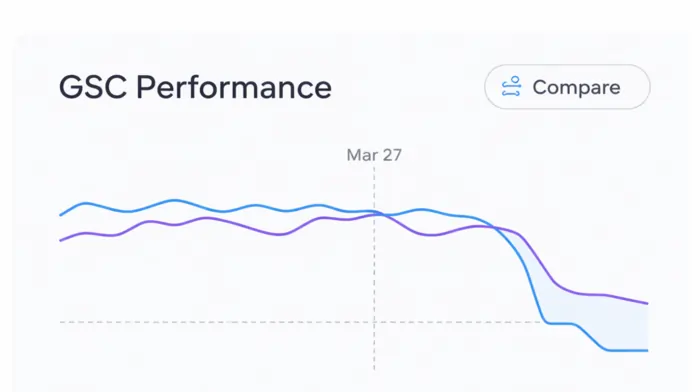
- After: March 27, 2026 → (today or the most recent complete day).
- Before: the same number of days immediately before March 27 (e.g., the previous 2–4 weeks).
- Review Total clicks and Total impressions in the summary and on the graph.
You’re looking for a clear, sustained change beginning around March 27–28—not a one‑day wiggle.
If you want a more analytical framework for this step, check out this methodology‑driven guide: How to Assess Core Update Impact on SEO.
3. Check Whether the Drop Is Organic Search Only (GA4)
To rule out tracking bugs or general seasonality affecting all traffic sources:
- In GA4, go to:
Reports → Acquisition → Traffic acquisition. - Filter or segment by Session default channel group = Organic Search.
- Compare March 27+ vs the prior period (same number of days).
If Organic Search sessions drop sharply while other channels (Direct, Paid, Social) are stable, that strongly suggests a search‑specific issue linked to the March 2026 Core Update or the Spam Update.
A broader “did an update hit me?” workflow is also described in Has Your Website Been Affected By A Google Algorithm Update?.
4. Identify Which Pages Lost the Most Visibility
Now drill into which URLs were impacted.
- In GSC Performance → Search results, click the Pages tab.
- Keep the same date comparison active.
- Sort by clicks in the Before period to see your top pages pre‑update.
- Check which of those now show the biggest drops in clicks and impressions in the Afterperiod.
Export both date ranges and compare them in a spreadsheet if needed. This helps you see whether:
- Losses are spread across the whole site (typical for a broad quality reassessment).
- Or concentrated in particular sections (e.g.,
/blog/,/reviews/,/ai‑content/folders).
A step‑by‑step approach to this kind of analysis is also outlined in Google Core Update: How to analyze your rankings?.
5. Identify Which Queries and Topics Were Hit
Next, understand what you stopped ranking for.
- Still in the same GSC report, switch to the Queries tab.
- With the date comparison on, sort by clicks or impressions for the Before period.
- Look for queries where:
- Impressions and clicks both plummet.
- Average position gets significantly worse (for example, from top‑5 to page two or worse).
Group your affected queries by theme:
- Do drops cluster around specific topic clusters, like “casino bonuses,” “loan calculators,” “health tips,” etc.?
- Are certain intent types hit more (e.g., “best X” and review keywords vs informational how‑tos)?
If core topic clusters lost visibility starting around March 27, that strongly points to the March 2026 Core Update.
6. Separate Core Update Impact from the March 2026 Spam Update
March 2026 had two major updates close together:
- A March 2026 Spam Update around March 24–25.
- The March 27, 2026 Core Update.
To avoid mis‑diagnosis:
- If your traffic drop starts around March 24–25 and then stabilizes, suspect the Spam Update, especially if you have scaled/AI‑heavy content, aggressive link patterns, doorway‑style pages, or other policy‑sensitive patterns. A good summary is Google Begins Rolling Out the March 2026 Spam Update.
- If the drop begins March 27–28 and continues as the rollout progresses, that’s more typical of a Core Update recalibrating how your overall site quality is assessed, as described in Google Begins Rolling Out March 2026 Core Update.
- If you see a sudden hit then continued decline, you might be affected by both (spam signals + core quality reassessment).
Spam updates are about enforcing policies; core updates are about re‑ranking based on quality and relevance.
7. Look for Site‑Wide vs Section‑Specific Damage
Use your exports from GSC and GA4 to determine whether the update hit everything or mainly certain areas.
Segment by:
- URL path (e.g.,
/blog/,/reviews/,/guides/,/tools/). - Content type (editorial guides vs money pages vs UGC).
- Content age (older evergreen vs recent posts).
Patterns to look for:
- Site‑wide impact: Most sections show similar percentage declines in impressions and clicks—this aligns with a broad core quality reevaluation.
- Section‑specific impact: Losses cluster in certain templates (e.g., thin programmatic pages, AI‑generated sections, UGC comments), suggesting local quality issues or spam signals.
This segmentation is exactly the kind of pattern analysis advocated in “How to Assess Core Update Impact on SEO” and similar post‑update survival guides.
8. Inspect SERPs for Your Lost Queries
Data tells you “what” changed; the SERPs show you how Google is now thinking about those queries.
- Take a sample of queries with the biggest drops.
- Search them in an incognito window (and ideally, using neutral location settings).
- Compare the current top 10 to what you remember or have logged before.
Ask yourself:
- Are new competitors ranking that clearly have stronger E‑E‑A‑T, better UX, or more in‑depth content than yours?
- Are thinner, AI‑spammy pages disappearing, replaced by sites with obvious real‑world experience and original data?
- Did Google start favoring different formats (in‑depth guides, comparisons, news results, videos) for these queries?
For additional commentary and patterns people are seeing, you can also read write‑ups like Google March 2026 Core Update: Timeline, SEO Impact & What to Do or Google March 2026 core update: What you need to know and how to adapt.
9. Check Technical & UX Signals That Might Be More Heavily Weighted
Early analysis of the March 2026 Core Update suggests Google is tightening multiple signals at once, including how content is delivered and experienced, not just what it says. This lines up with their ongoing emphasis on Core Web Vitals and page experience in the Core Web Vitals search documentation.
To see whether technical/UX issues line up with your drops:
- Run affected pages through PageSpeed Insights or Lighthouse and check LCP, INP, and CLS.
- In GSC, open the Core Web Vitals report and look for spikes in “Needs improvement” or “Poor” URLs that correlate with the time period.
- Audit your templates: did you recently add heavy scripts, pop‑ups, ad units, or layout changes that make content slower or harder to use?
Several agency breakdowns, such as Google March 2026 Core Update: Major Changes & SEO Impact and Google Core Update March 2026: Rollout, Facts & Tips, mention a stronger emphasis on UX and content quality combined.
10. Decide If You Were Hit—and What to Do Next
After going through the steps above, you should have enough evidence to classify your situation.
You were likely hit by the March 2026 Core Update if:
- Organic search traffic and GSC clicks/impressions drop sharply starting March 27–28, not earlier.
- The decline persists for days, not just a blip, and affects many queries and pages.
- The SERPs for your main queries now feature competitors with better E‑E‑A‑T, fresher content, stronger information gain, and cleaner UX.
You were likely affected more by the Spam Update if:
- A sudden drop occurs around March 24–25, especially on pages with aggressive link patterns, scaled/AI content, doorway‑style pages, or other spam‑like signals, as described in Google Begins Rolling Out the March 2026 Spam Update.
You’re probably seeing normal volatility if:
- Changes are small, temporary, and bounce back within a few days.
- There’s no clear alignment between your drop and the official update window.
If your analysis points toward a real March 2026 Core Update impact, treat it as a diagnostic signal from Google’s ranking systems, not a death sentence. Google’s own core updates documentation recommends:
- Waiting until the rollout completes.
- Comparing the right date ranges.
- Reviewing your top pages and queries.
- Focusing on raising overall site quality: content, E‑E‑A‑T, UX, and technical health.
Core updates are broad recalibrations, not manual penalties. Recovery usually comes from systematically improving your site and letting future updates re‑evaluate you, as many post‑mortems from previous updates (like Surviving the March 2024 Google core update) have shown.