





Set up Advanced Rank Math once you finish the basic setup of Rank Math SEO, the real power comes from its advanced modules. These tools help you scale schema markup, keep URLs clean with smart redirections, and use Content AI to write better, more semantic content.
This guide will show you how to use Schema, Redirections, and Content AI in a simple, step‑by‑step way. For basic setup instructions, start with How to Configure Rank Math SEO Step by Step (For Beginners), and for a full feature overview see Rank Math SEO: The Ultimate Guide to Optimizing Your WordPress Site.
1. Turn On the Right Advanced Modules
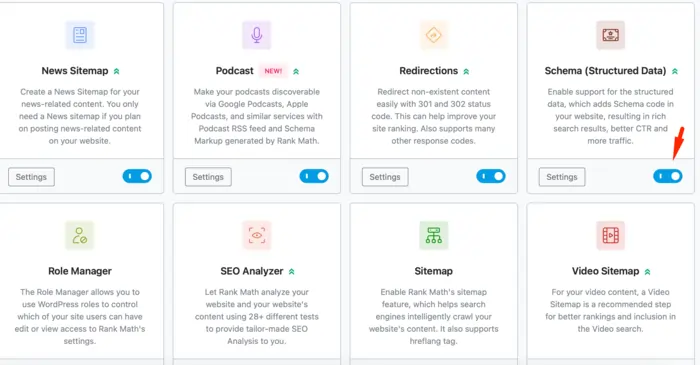
Before you use advanced features, make sure the right modules are active.
- Go to Rank Math SEO → Dashboard.
- Switch to Advanced Mode if you are still in Easy Mode.
- Enable these modules:
- Schema (Structured Data)
- Redirections
- 404 Monitor
- Content AI (if available in your plan)
Advanced Mode unlocks the tools you need for serious SEO, GEO, and AEO work, especially around structured data and redirects.
2. Mastering Schema Markup in Rank Math
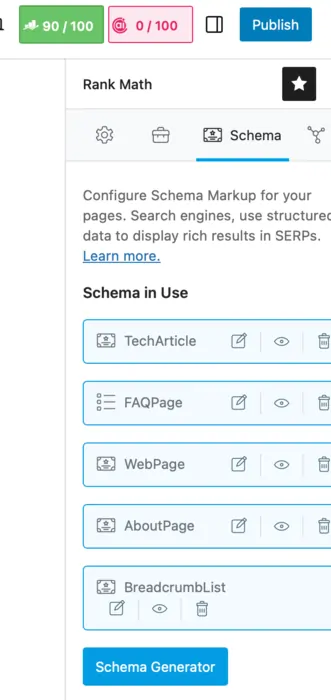
Schema markup is how you explain your content to search engines in a structured way. Rank Math gives you both simple defaults and an Advanced Schema Generator to go deeper.
2.1 Set Smart Default Schema Types
First, set default schema per post type:
- Go to Rank Math SEO → Titles & Meta.
- Click the Posts tab.
- Set Schema Type to Article (or BlogPosting) for most blogs.
- Click the Pages tab and choose the schema type that matches your page (Article, Service, or LocalBusiness etc.).
These defaults make sure every new post has at least basic schema, even if you forget to customize it later.
2.2 Use the Schema Tab in the Editor
When editing a post:
- Click the Rank Math SEO score.
- Open the Schema tab.
- Click Schema Generator.
Here you can choose schema types such as:
- Article
- FAQ
- HowTo
- Product
- Local Business
- Review
Select the type that matches the page and fill in the fields Rank Math asks for. Required fields are marked clearly, so you know what you must complete to avoid warnings in tools like Rich Results Test.
To understand schema in more detail, see Rank Math’s guide: Schema Markup – The ONLY Guide You Need To Read in 2026. For general background, you can also check Google’s documentation on structured data.
2.3 Combine Multiple Schema Types (Schema Stacking)
For many pages, a single schema type is not enough. In 2026 it is common to stack schema for better visibility.
Examples:
- Blog tutorial: Article + FAQ + HowTo
- Local service page: LocalBusiness + Service + FAQ
- Review page: Product + Review + Organization
Rank Math’s schema generator lets you add multiple schema types to one page and control each set of fields. This gives search engines more context and supports rich results and AI Overviews.
2.4 Use Schema Templates and Display Rules
If you publish many similar pages, templates save a lot of time.
- In the Schema Generator, configure schema once for a typical post.
- Click Save as Template.
- You can then apply this template to future posts with one click.
With display rules, Rank Math can auto‑apply templates:
- To specific post types (all “Review” posts)
- To posts in a category (all “Tutorials”)
- To specific pages
This makes it possible to roll out schema to hundreds or thousands of URLs in a controlled, scalable way.
3. Redirections: Keeping Your URLs Clean
Redirections are vital when you change URLs, prune content, or fix 404 errors. Rank Math’s Redirections module gives you a built‑in manager so you do not need another plugin.
3.1 Enable and Access the Redirections Module
- Go to Rank Math SEO → Dashboard.
- Make sure Redirections is enabled.
- Go to Rank Math SEO → Redirections to open the manager.
In Advanced Mode, you can also access redirect settings under Rank Math SEO → General Settings → Redirections to choose defaults, like 301 vs 302.
For step‑by‑step screenshots, see Rank Math’s doc: How to Set Up Redirections.
3.2 Create a Simple 301 Redirect
To redirect an old URL to a new one:
- Click Add New in the Redirections screen.
- In Source URL, enter the old path (for example,
/old-rank-math-guide/). - In Destination URL, enter the full new URL (for example,
https://jingrey.com/seo/rank-math-seo). - Set Redirection Type to 301 Permanent Move.
- Set Status to Active, then save.
Rank Math now sends users and crawlers from the old URL to the new one, preserving link equity and avoiding 404 errors.
For video walk‑throughs, you can watch tutorials like: How to Set Up 301 Redirects in Rank Math.
3.3 Use the 404 Monitor to Find Problems
The 404 Monitor module logs when visitors or bots hit missing pages.
- Enable it in Rank Math SEO → Dashboard.
- Go to Rank Math SEO → 404 Monitor.
- Sort by hits to see which missing URLs are most common.
For any important 404 URLs, create a redirect:
- Send them to the closest relevant page (for example, a new Rank Math tutorial, a category page, or your main Rank Math pillar).
- Avoid bulk redirecting everything to the homepage; that can confuse both users and search engines.
You can see a practical example in this guide: Set Up a 404 Page & Implement 301 Redirects Using Rank Math.
3.4 Advanced Redirect Patterns
Rank Math also supports more advanced redirects:
- Redirect multiple URLs to one destination
- Use wildcards or parameterized URLs for patterns
- Map URLs with query strings to clean URLs
These features are useful when you clean up tracking parameters or rename parts of a site structure.
4. Content AI: Smarter Content, Not Just More Words
Content AI is Rank Math’s AI assistant. It lives inside your WordPress editor and helps you with keyword ideas, outlines, FAQs, and even paragraph drafts.
The goal is not to auto‑generate entire posts, but to support your own expertise with better prompts, structure, and semantic coverage.
You can read more about how Content AI works in tutorials such as: Rank Math Content AI Explained and this integration guide for Elementor: Elementor SEO Made Easy with Rank Math’s Content AI.
4.1 Enable and Configure Content AI
- In Rank Math SEO → Dashboard, enable Content AI.
- Go to Rank Math SEO → General Settings → Content AI to set:
You may need an active Rank Math account and credits to use Content AI features.
4.2 Use Content AI Inside the Editor
When editing a post:
From here you can:
- Generate keyword suggestions, related terms, and questions to cover.
- Get headline ideas and meta description drafts.
- Ask the chat‑style assistant for quick SEO tips or content angles.
- Use a blog post wizard to generate outlines or sections.
Always review and edit AI‑generated content. Use it to fill gaps and structure ideas, not as a final draft.
5. Putting It Together with Pillar and Cluster Content
Advanced Rank Math features work best when they support a clear content structure.
On your site you already use:
- A main pillar: Rank Math SEO: The Ultimate Guide to Optimizing Your WordPress Site
- Beginner setup: How to Configure Rank Math SEO Step by Step (For Beginners)
- This advanced guide for schema, redirections, and Content AI
- Extra clusters for pillar content, plugin comparisons, and AEO/GEO
To connect these:
- Add internal links in each guide back to the pillar at
https://jingrey.com/seo/rank-math-seo. - Use schema stacking (Article + FAQ) on key guides.
- Use redirections to consolidate old or overlapping Rank Math content into this updated 2026 cluster.
You can also study advanced schema strategies here: Advanced SEO Schema Markup Strategies for 2026.
This makes your Rank Math content semantic, authentic, and useful, and at the same time friendly to SEO, AEO, and GEO.
Frequently Asked Questions (Advanced Rank Math)
Do I need advanced schema if I already have basic Article schema?
Basic Article schema is a good start, but stacking types like FAQ, HowTo, Product, or LocalBusiness helps search engines and AI systems understand your page at a deeper level and unlock more rich results.
How many redirects are “too many” in Rank Math?
There is no strict number, but you should avoid long redirect chains and unnecessary hops; redirect directly from the old URL to the best new URL and remove obsolete rules when they are no longer used.
Is Content AI safe for SEO, or will it create duplicate content?
Content AI is safe if you use it as a helper, not as a full auto‑writer; always customize outputs, add your own examples, and keep your brand voice, especially in competitive niches.
Do I need Rank Math Pro to use these advanced features?
Many advanced schema and redirection tools exist in the free plugin, but Rank Math Pro adds more schema types, analytics, and automation features that help at scale.
How do these advanced features help with AEO and GEO?
Rich schema, clean redirects, and AI‑assisted, entity‑rich content make it easier for search engines and generative systems to understand, trust, and reuse your pages in AI Overviews and answer results.