





What is Poppy AI Key Takeaways
I have been working in digital marketing and content creation for almost 18 years—since 2008.
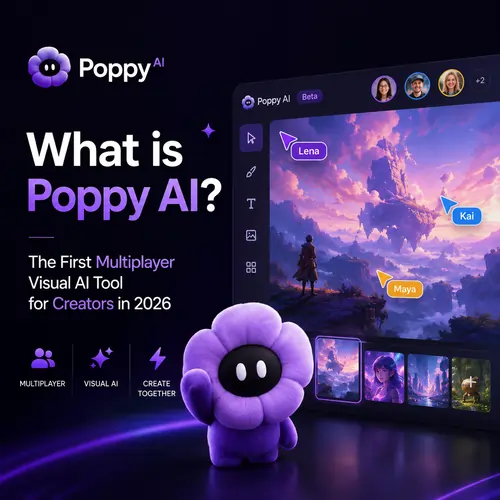
Why I Believe Poppy AI Is a Game-Changer for Creators Like You and Me
I have been working in digital marketing and content creation for almost 18 years—since 2008. I have seen tools come and go. I have used ChatGPT for drafting, Gemini for research, Claude for long-form writing, and Perplexity for fact-checking. Each one is powerful, but they all share a frustrating flaw: they are single-player. You sit alone in a chat window, typing prompts, copying outputs, and pasting them somewhere else. If you work with a team—or if you manage multiple channels alone—you end up juggling tabs, documents, and spreadsheets just to keep your content organized. For a related guide, see The New Rules of SEO After Agentic AI (2026 Edition).
That is exactly where Poppy AI changes everything. When I first tested it, I felt like someone finally understood the messy, chaotic, visual way most creators actually think. We do not think in linear text. We think in boards, sticky notes, images, links, and timelines. Poppy AI mirrors that mental model. It is a multiplayer visual AI tool for creators that lets you and your team work on the same canvas in real time. You can research a topic with AI, drag findings into a content calendar, brainstorm video titles with your editor, and draft a script—all inside one space.
In this article, I will share my honest Poppy AI review 2026, explain exactly how Poppy AI works, compare it with popular tools like ChatGPT and Gemini, and help you decide if it is the right fit for your workflow. I will also include a special section for my readers in Cambodia, because I know តើ Poppy AI ជាអី is a question many of you are asking.
What Is Poppy AI? The Short and the Long Answer
Let me start with the simplest explanation. What is Poppy AI? It is a visual AI workspace where you and your team can collaborate in real time using an infinite canvas. Unlike ChatGPT, where you type and wait for a response, Poppy AI lets you drag, drop, connect, and organize content visually. You can research a topic, save insights as cards, group them by theme, turn them into a content plan, and then generate drafts—all with AI assistance and without leaving the canvas.
The keyword here is “multiplayer.” Poppy AI is not just for solo creators. It is built for multiplayer AI collaboration. That means your editor, designer, strategist, and writer can all be on the same board at the same time, adding ideas, moving cards, and seeing changes instantly. For anyone running a YouTube channel, a blog, a podcast, or a social media brand, this is a massive productivity boost.
Poppy AI Explained: The Core Idea
Poppy AI explained in one sentence: it is an AI-powered visual canvas that combines research, ideation, planning, writing, and collaboration into one seamless experience. Think of it as your entire content workflow—from the first spark of an idea to the final publish button—living inside a shared visual board.
Here is what happens when you open a new Poppy board:
- You see a blank, infinite canvas (like Miro or Figma).
- You can type a question or a topic into the AI assistant built right into the canvas.
- The AI returns research summaries, outlines, keywords, and even competitor insights—as visual cards you can drag around.
- You and your team can add sticky notes, images, links, and comments.
- You can turn a card into a content asset (blog post, video script, social caption) with one click.
This is not just a nice-to-have. For anyone managing multiple content streams—like a faceless YouTube channel plus a blog plus social media—Poppy AI becomes the single source of truth for everything you are creating.
Poppy AI Features: What Makes It Stand Out
When I started testing Poppy AI features, I was looking for one thing: does this tool actually save me time, or is it just another shiny object? After using it for several weeks, here are the features that genuinely made a difference in my workflow.
1. The AI-Powered Visual Canvas
This is the heart of Poppy AI. Instead of a chat window, you get an AI-powered visual canvas where everything lives in cards, columns, and connections. You can research a topic, and the AI automatically creates a card with a summary, source links, and suggested angles. You can then drag that card into a planning column, add a due date, and assign it to a teammate. It is like having a research assistant, a project manager, and a designer all rolled into one.
2. Real-Time Multiplayer Collaboration
Multiplayer AI collaboration is the reason I would recommend Poppy AI to any agency or team. I tested it with a remote editor based in another country. We were both on the same board, moving cards, adding comments, and watching the AI generate new ideas based on our conversation. It felt alive. There was no back-and-forth email chain, no version control confusion. We were simply working together, visually.
3. AI Research and Organization Tool
Poppy AI is also a powerful AI research and organization tool. When I needed to write an article about AI for faceless YouTube channels, I typed my topic into Poppy’s research assistant. Within seconds, it returned a structured board with competitor analyses, keyword clusters, trending questions, and even related video topics. I did not need to open a separate browser tab for Google, Perplexity, or YouTube. Everything was already inside my canvas.
4. Drag-and-Drop AI Workspace
The entire interface is built around a drag-and-drop AI workspace. You can move cards between columns, group them into clusters, and connect related ideas with lines. This may sound simple, but for visual thinkers like me, it is a game-changer. I can literally see my content strategy forming in front of my eyes.
5. Content Repurposing Platform
One of my favorite Poppy AI features is the ability to repurpose content. I can take a research card about video SEO, and with one click, ask the AI to turn it into a Twitter thread, a LinkedIn post, a YouTube script outline, or a blog section. This makes Poppy AI an excellent content repurposing platform for creators who publish across multiple channels. For a related guide, see 10 Ways Poppy AI Saves Content Creators Hundreds of Hours Every Month Focus.
How Poppy AI Works: A Step-by-Step Poppy AI Tutorial
If you are wondering how Poppy AI works, let me walk you through a real example. I will show you how I used Poppy AI to plan a week of content for a small faceless YouTube channel about productivity tools. For a related guide, see Create Viral YouTube Scripts in Minutes with Poppy AI.
Step 1: Create a New Board
When I log in, I click “New Board” and give it a name—say, “Productivity Tools Week 12.” The blank canvas opens, and I see the AI assistant icon at the bottom left.
Step 2: Research with AI
I type: “Research top 5 productivity tools for freelancers in 2026.” The AI returns a set of cards, each containing a tool name, key features, pricing, and user reviews. It also suggests related subtopics like “time tracking apps” and “project management software.” I drag the cards I like into a column labeled “Research.”
Step 3: Brainstorm with My Team
I invite my video editor to the board. We both see the same canvas. I add a sticky note: “Video idea: Compare Tool A vs Tool B.” My editor adds: “Thumbnail concept: split screen.” We move cards around and vote on the best ideas using emoji reactions built into Poppy.
Step 4: Build a Content Calendar
I create columns for each day of the week. I drag our best video ideas into Monday, Wednesday, and Friday. For each card, I add a due date, assign it to a team member, and attach a brief generated by the AI.
Step 5: Generate Scripts and Drafts
I click on the card for Monday’s video and select “Generate Script.” The AI writes a full script outline, including an intro, key points, and a call to action. I edit it directly on the card. Later, my editor can access the same card to see the final script and start production.
This entire process—from research to a ready-to-film script—took me under 30 minutes. Without Poppy AI, this would have taken at least half a day, involving multiple tools and endless email threads.
Poppy AI Review 2026: My Honest Experience After Several Weeks
This is my Poppy AI review 2026, and I want to be completely transparent. I am not a paid spokesperson. I am a busy creator, marketer, and agency owner who tested this tool because I was tired of content chaos. Here is what I loved and what I think still needs work.
What I Loved
- The visual approach: Finally, a tool that matches how I think. I am a visual organizer, and the canvas format eliminated the friction I felt with text-only AI tools.
- Real-time team collaboration: Working on the same board with my remote team felt like being in the same room. No more “Can you send me the latest version?”
- Speed of research: The AI research assistant is fast and accurate. It saved me hours of manual searching.
- Content repurposing: Turning one research card into multiple content formats is a superpower for anyone scaling their content.
What Could Be Better
- Learning curve: If you are used to ChatGPT’s simple chat interface, Poppy AI’s canvas might feel overwhelming at first. Give it a few hours, and it will click.
- Mobile experience: The desktop version is excellent, but the mobile app (currently in beta) is limited. I would not rely on it for heavy editing on the go.
- Template library: Poppy AI has templates, but I would love more pre-built workflows for specific niches like YouTube automation or podcast show notes.
Overall, I would rate Poppy AI 4.5 out of 5 stars for content teams. For solo creators, it is still powerful, but the real magic happens when you invite others onto your board.
Poppy AI vs ChatGPT vs Gemini vs Claude vs Perplexity vs Microsoft Copilot
A lot of people ask me: What makes Poppy AI different from ChatGPT? Or ChatGPT vs Poppy AI, which one should I use? Let me break it down in a way that is useful for creators.
| Feature | Poppy AI | ChatGPT | Gemini | Claude | Perplexity | Microsoft Copilot |
|---|---|---|---|---|---|---|
| Interface | Visual canvas | Chat window | Chat + some visual | Chat window | Search + chat | Sidebar / chat |
| Multiplayer collaboration | Yes, real-time | No (single user) | No (single user) | No (single user) | No (single user) | Limited (integrations) |
| Research workflow | Built-in visual research | Manual prompting | Good with Google search | Strong but manual | Excellent for search | Good with M365 |
| Content planning | Native calendar + canvas | No native planning | No native planning | No native planning | No native planning | No native planning |
| Best for | Collaborative visual teams | Solo writers | Research + multimodal | Long-form writing | Deep research | Office productivity |
As you can see, each tool has its strength. ChatGPT for content creation is great for drafting solo. Gemini AI content research is strong if you want multimodal answers. Claude AI writing assistant excels at long-form structure. Perplexity AI research workflow is superb for fact-checking. Microsoft Copilot productivity tools integrate well into Office apps.
But none of them offer the multiplayer visual AI tool for creators experience that Poppy AI delivers. If you work with a team, or if you manage multiple content projects visually, Poppy AI fills a gap that no other tool currently does.
Who Should Use Poppy AI? (And Who Should Skip It)
Who should use Poppy AI? Based on my experience, I recommend it for:
- Content creators who manage multiple channels and need a central hub for ideas, research, and planning.
- YouTubers (especially faceless channel owners) who need to plan video topics, research competitors, and collaborate with editors or scriptwriters.
- Digital marketers and agencies who run content campaigns for clients and need real-time team collaboration.
- Remote teams that struggle with content workflow and want a single source of truth.
- Anyone tired of jumping between ChatGPT, Google Docs, Trello, and spreadsheets to manage their content.
Who should skip it:
- Solo creators who only write short social media posts and do not need visual planning.
- People who prefer simple chat interfaces and do not want to learn a new visual tool.
- Teams that are already deeply invested in a specific project management tool and do not want to migrate workflows.
Poppy AI for Content Creators: Practical Use Cases
Let me give you specific examples of Poppy AI for content creators in different niches.
For YouTubers
You can create a board for your channel. Research trending video ideas using the AI assistant. Plan your upload schedule using a visual calendar. Write scripts and share them with your editor—all on the same canvas. AI tools for YouTubers often focus on editing or thumbnails. Poppy AI focuses on the planning and writing stages, which is where many faceless creators struggle.
For Bloggers and Writers
Use Poppy AI as a visual content planning tool. Research keywords, create content clusters, and outline articles. The AI can help you generate drafts based on your research cards, saving hours of staring at a blank page.
For Social Media Managers
Plan a month of posts in one board. Each card can be a post idea. Use columns for each platform (Instagram, TikTok, LinkedIn). The AI can suggest captions, hashtags, and even repurpose a blog post into a thread.
For Agencies
Poppy AI becomes your content strategy software. Create boards for each client. Collaborate with your team in real time. Use the AI to research the client’s competitors and generate content ideas. Move approved ideas into a production pipeline. The transparency and speed are unmatched.
Poppy AI for Cambodian Creators: តើ Poppy AI ជាអ្វី?
សួស្តីអ្នកទាំងអស់គ្នានៅកម្ពុជា! ខ្ញុំដឹងថាអ្នកកំពុងស្វែងរកឧបករណ៍ដែលអាចជួយអ្នកបង្កើតមាតិកាឱ្យកាន់តែងាយស្រួល និងលឿនជាងមុន។ សំណួរដែលខ្ញុំឮញឹកញាប់គឺ តើ Poppy AI ជាអី? សូមអោយខ្ញុំពន្យល់ជាភាសាខ្មែរសាមញ្ញ។
Poppy AI គឺជាកន្លែងធ្វើការដែលមើលឃើញ (Visual Workspace) ដែលប្រើ AI ដើម្បីជួយអ្នក និងក្រុមរបស់អ្នកបង្កើតមាតិកាជាមួយគ្នា។ វាមិនមែនគ្រាន់តែជា Chatbot ទេ។ វាជាក្តារដែលអ្នកអាចអូស ទាញ សរសេរ និងរៀបចំគំនិត បានយ៉ាងងាយស្រួល។ ប្រសិនបើអ្នកជា YouTuber, Blogger, ឬអ្នកគ្រប់គ្រងទំព័រ Facebook, Poppy AI អាចជួយសន្សំសំចៃពេលវេលារបស់អ្នកបានច្រើន។
ខ្ញុំសូមណែនាំអោយសាកល្បង Poppy AI ជាពិសេសប្រសិនបើអ្នកមានក្រុមតូចមួយដែលធ្វើការលើមាតិកា YouTube, Tik Tok, និងប្លក់ក្នុងពេលតែមួយ។ Poppy AI សម្រាប់អ្នកបង្កើតមាតិកា គឺជាចម្លើយដែលអ្នកកំពុងស្វែងរក។
Is Poppy AI Worth It? Pricing and Value
Is Poppy AI worth it? Let me help you decide. Poppy AI offers a tiered pricing model. At the time of writing this Poppy AI review 2026, the plans are:
- Free plan: Limited boards, single user, basic AI features. Good for testing the water.
- Pro plan (around $29/month): Unlimited boards, up to 5 team members, full AI features, and advanced templates.
- Business plan (around $99/month): Unlimited team members, priority support, custom branding, and API access.
For solo creators, the free plan is enough to understand how Poppy AI works. For teams and agencies, the Pro or Business plan pays for itself within the first week by eliminating the need for multiple tools and reducing meeting times. I personally use the Pro plan for my agency and it has already replaced Trello, a part of our Google Docs workflow, and some of our ChatGPT usage.
Final Verdict: Should You Use Poppy AI in 2026?
I have been in this industry long enough to be skeptical of new tools. But Poppy AI is different. It is not just another AI wrapper. It is a genuinely new way of working—a visual-first AI tool that matches the way creative people actually think. If you are a content creator, marketer, or agency owner who is tired of content chaos, I strongly recommend giving it a try.
What is Poppy AI? It is the multiplayer visual AI tool for creators that I wish I had five years ago. It brings research, planning, writing, and collaboration into one beautiful canvas. It is not perfect—the mobile experience needs work—but for desktop-based content teams, it is the most exciting tool I have seen in 2026.
Useful Resources
If you want to learn more about Poppy AI and stay updated on the latest features, I recommend these two resources:
- Visit the official Poppy AI website for documentation and tutorials: Poppy AI Official Site
- For a broader look at AI content creation tools, check out this article from TechCrunch: Best AI Content Creation Tools 2026
Frequently Asked Questions About What is Poppy AI
What is Poppy AI ?
What is Poppy AI? It is the first multiplayer visual AI workspace for creators. It combines research, planning, collaboration, and content creation into one real-time canvas.
How does Poppy AI work ?
How does Poppy AI work? You open a visual canvas, use the built-in AI assistant to research topics, drag results into cards, collaborate with your team in real time, and generate content drafts directly from the canvas.
Is Poppy AI worth it ?
Is Poppy AI worth it? For teams and creators who manage multiple content streams, yes. The time saved on research, planning, and collaboration usually justifies the cost within the first week.
Who should use Poppy AI ?
Who should use Poppy AI? Content creators, YouTubers, marketers, agencies, remote teams, and anyone who wants a visual, collaborative way to plan and produce content.
What makes Poppy AI different from ChatGPT ?
What makes Poppy AI different from ChatGPT? Poppy AI is a visual, multiplayer workspace, while ChatGPT is a single-user chat interface. Poppy AI focuses on team collaboration and visual planning.
Can teams collaborate in Poppy AI ?
Can teams collaborate in Poppy AI? Yes. Real-time multiplayer collaboration is a core feature. Multiple users can work on the same canvas simultaneously.
Is Poppy AI good for content creators ?
Is Poppy AI good for content creators? Absolutely. It helps with research, idea organization, content planning, and drafting—all within one visual workspace.
What are the best AI tools for creators in 2026 ?
What are the best AI tools for creators in 2026? Poppy AI, ChatGPT, Gemini, Claude, Perplexity, and Microsoft Copilot are all strong options. Poppy AI is best for collaborative visual workflows.
ChatGPT vs Poppy AI : which is better?
ChatGPT vs Poppy AI depends on your needs. ChatGPT is better for solo writing tasks. Poppy AI is better for team-based content planning and visual organization.
Can Poppy AI help with YouTube content?
Yes. Poppy AI is great for YouTubers. You can research video ideas, plan upload schedules, write scripts, and collaborate with editors on one board.
Does Poppy AI have a free plan?
Yes, Poppy AI offers a free plan with limited boards and basic AI features. It is a good way to test the tool before upgrading.
Is Poppy AI suitable for faceless YouTube channels?
Yes. Faceless channel owners can use Poppy AI to research topics, plan scripts, and manage content workflows without needing to appear on camera.
Can Poppy AI replace Trello or Asana?
For content planning, Poppy AI can replace Trello and similar tools because it offers a visual board with AI-powered features. It is not a full project management suite, but it works well for content workflows.
Does Poppy AI work on mobile?
The mobile app is in beta and currently limited. The desktop version offers the full experience. Heavy editing on mobile is not recommended yet.
What languages does Poppy AI support?
Poppy AI supports multiple languages, including English and Khmer. You can research and create content in your preferred language.
How secure is Poppy AI?
Poppy AI uses industry-standard encryption for data in transit and at rest. Business plans offer additional security features and custom data handling policies.
Can I export content from Poppy AI?
Yes. You can export boards as PDF, image files, or text. Individual content cards can be copied or exported directly to Google Docs or Notion.
Is Poppy AI a good tool for agencies?
Yes. Agencies benefit from Poppy AI’s real-time collaboration, client boards, and AI-powered research. It helps streamline content production across multiple clients.
How does Poppy AI compare to Notion AI?
Notion AI is a text-based assistant inside a document tool. Poppy AI is a visual canvas with real-time multiplayer collaboration. Poppy AI is better for visual planning and team brainstorming.
What is the future of Poppy AI?
The future of Poppy AI includes deeper integrations with social media platforms, enhanced mobile support, and more advanced AI agents that can execute tasks directly on the canvas.